Tracking per app data usage on Android without a VPN
Many data monitor apps run a local VPN to see your traffic. Data Usage Monitor does not. It reads the statistics Android already keeps, through NetworkStatsManager.

A lot of data monitor apps work by running a local VPN so they can see every packet. That is heavy on battery, it blocks you from using a real VPN, and it asks users for a lot of trust.
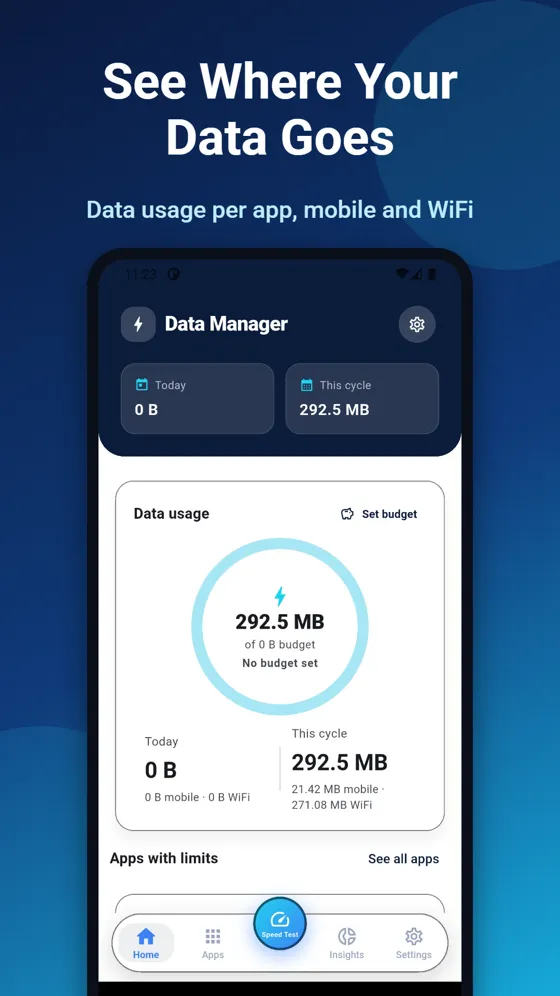
When we built Data Usage Monitor, we went the other way. Android already counts how much data each app uses on mobile and on WiFi. The app simply reads those numbers, compares them against limits you set, and sends a notification when you get close.
NetworkStatsManager does the counting
The numbers come from Android's NetworkStatsManager. Three calls cover almost everything:
querySummaryForDevicefor the device total on mobile or WiFiquerySummaryfor per app buckets in a time rangequeryDetailsForUidfor one app's history
These calls live in Kotlin, behind a Flutter MethodChannel. The Flutter side asks for "usage for this period" and gets back plain lists it can render. All the Android specific work, including mapping UIDs to app names and icons with PackageManager, stays native and runs off the main thread.
The one permission that matters
Reading other apps' usage needs Usage access, a special permission users grant in system settings rather than in a normal dialog. The app explains why it needs it, then opens the right screen with Settings.ACTION_USAGE_ACCESS_SETTINGS. Without it, the app shows a clear setup step instead of empty charts.
Limits that keep working in the background
Soft limits are checked by a periodic background task using WorkManager, every 15 minutes. That is the shortest interval Android allows for periodic work, and it is plenty for data limits.
A small BOOT_COMPLETED receiver makes sure the check is scheduled again after the phone restarts. Notifications use the normal Android channels, so users can tune or mute them like any other app.
Tracking, not blocking
The app does not cut anyone off. It tells you, early, so you can decide. That keeps the permissions small, the battery cost low and the privacy story simple: nothing leaves the device, and there is no account.